
OMAX IntelliMAX Software does more than help run a waterjet. It gives operators a set of built-in automation tools that can make everyday cutting more productive, more consistent, and easier to manage.
Some of those tools are easy to overlook because they work in the background. Others can change how a shop approaches programming, cut quality, part reproduction, and material use. Together, they help operators get more from the OMAX waterjet cutting process without adding unnecessary complexity.
Designed specifically for abrasive waterjet cutting, the OMAX IntelliMAX Software Suite brings automation into the areas that matter most: tool pathing, corner control, taper compensation, part tracing, nesting, and machine performance.
At Spark & Co, our customers running an OMAX machine have access to these features right from installation. Here are five IntelliMAX features and connected software tools that you may not know can help improve productivity with every cut.
Automatic Tool Pathing Reduces Programming Time

For many operators, programming tool paths is a regular part of the job. The challenge is that even straightforward pathing can take time, and when that programming time is added to the total job, shaving off an hour or two with automation can make a real difference.
With OMAX IntelliMAX Software, operators do not need to build every tool path from scratch. The software generates cutting paths from imported geometry while accounting for cut quality, tabbing, lead ins, lead outs, traverse moves, and abrasive jet behavior.
That includes automating practical programming details that can affect both part quality and handling after the cut. Tabbing helps keep parts secure in the parent material until the operator is ready to remove them, while automated lead-in and lead-out placement helps control where the jet enters and exits the cut. These small pathing decisions can make a noticeable difference in edge quality, part stability, and the amount of cleanup required after cutting.
This automation eliminates repetitive programming tasks and helps reduce human error. Instead of spending time determining where the machine should travel, operators can focus on production while the software handles much of the path generation.
For shops processing a variety of parts every day, automatic tool pathing can significantly reduce programming time while helping ensure consistent results across shifts and operators.
Corner Passing Helps Improve Accuracy at Direction Changes
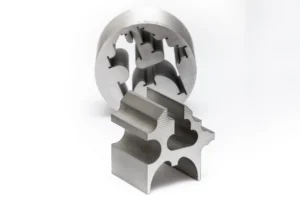
Corner accuracy in waterjet cutting depends on more than simply moving from one line to the next.
Because a waterjet is not a solid cutting tool, the software has to account for the way the cutting stream moves, slows, turns, and accelerates through a change in direction. Without the right motion control, those transitions can affect edge quality, part geometry, and dimensional accuracy.
Corner Passing in OMAX IntelliMAX Software helps automate how the machine handles these transitions. By managing motion through corners and direction changes, the software helps the cutting head maintain a controlled path, reducing manual adjustment for each geometry.
This is especially useful for parts with tight profiles, internal corners, detailed shapes, or features where a small amount of overcut or undercut can create downstream fit issues.
For shops trying to improve waterjet cut quality without adding programming time, automated corner control can help produce more consistent parts while keeping the cutting process easier to manage.
IntelliTaper Automatically Compensates for Taper
In manufacturing, part quality often comes down to controlling small variations that can affect fit, finish, and final assembly. IntelliTaper helps address those variations by supporting straighter edges and tighter dimensional control for precision work.
Using advanced software algorithms, IntelliTaper works in conjunction with the OMAX TiltaJET cutting head to compensate for taper as the machine cuts. IntelliMAX calculates the precise angle needed, while TiltaJET positions the nozzle to help offset the natural taper from the abrasive jet. Together, they help improve edge quality and dimensional accuracy across a wide range of materials and thicknesses.
For manufacturers producing precision components, IntelliTaper helps reduce secondary operations, minimize rework, and improve overall part quality without adding additional complexity to the programming process.
IntelliTrace Helps Turn Existing Parts into Cut-Ready Files
Not every job starts with a clean CAD file. In many shops, operators may need to reproduce an existing part, work from a template, or convert a physical shape into something that can be programmed and cut.
IntelliTrace supports that workflow by helping users trace a part and bring its geometry into the IntelliMAX programming environment. Instead of redrawing every feature manually, operators can use IntelliTrace as a practical bridge between an existing physical part and a cut-ready waterjet file.
That can be especially useful for replacement parts, reverse engineering work, templates, one-off jobs, or legacy components where the original drawing is missing or incomplete. By reducing manual drawing time, IntelliTrace helps make the front end of the waterjet process more flexible.
For shops that regularly move between digital files, physical samples, and customer-provided parts, IntelliTrace adds another layer of automation that helps get usable geometry into production faster.
ProNest for Waterjet Takes Nesting Beyond the Basics
Nesting is one of the most direct ways to improve material utilization, especially for shops cutting multiple parts from the same sheet or plate. IntelliMAX includes basic nesting tools that can help with simpler jobs, but more complex production work often calls for a dedicated nesting solution.
That is where ProNest for waterjet comes in. ProNest is an optional add-on that works alongside OMAX IntelliMAX Software rather than being a built-in IntelliMAX feature. It brings more advanced automatic nesting strategies into the workflow, helping operators arrange parts more efficiently and get more value from each piece of raw material.
For OMAX users, ProNest can import and export OMX and ORD files and is designed to work directly alongside IntelliMAX. That connection helps shops move from part programming to more efficient nesting without treating material layout as a separate, disconnected process.
For manufacturers cutting batches of parts, mixed part shapes, or high-value materials, ProNest takes nesting to the next level. It helps reduce waste, improve material yield, and support a more efficient cutting workflow while keeping IntelliMAX at the center of the OMAX waterjet programming process.
Let Automation Handle the Repetitive Decisions
The best automation often goes unnoticed because it simply works.
Features like Automatic Tool Pathing, Corner Passing, IntelliTaper, IntelliTrace, and ProNest for waterjet help simplify programming, improve cut quality, reduce guesswork, increase material utilization, and support consistent results.
As manufacturers work to improve efficiency, reduce scrap, and address skilled labor challenges, software automation is becoming as important as machine performance. The OMAX IntelliMAX Software Suite helps manufacturers spend less time managing the cutting process and more time producing high quality parts.
Frequently Asked Questions
How does waterjet software automation improve cut quality?
Waterjet software automation improves cut quality by applying cutting models, optimizing tool paths, compensating for taper, and managing motion through corners. In OMAX IntelliMAX Software, these automated decisions help reduce manual programming variation and support more consistent part results.
What makes OMAX IntelliMAX different from general CAD/CAM software?
OMAX IntelliMAX was developed specifically for abrasive waterjet cutting. Instead of treating waterjet as a generic cutting process, it combines CAD import, tool path generation, machine control, cut optimization, taper compensation, and monitoring tools in one waterjet-focused software environment.
Can IntelliMAX automation help reduce operator workload?
Yes. IntelliMAX automation can help reduce operator workload by handling repetitive programming decisions, calculating cutting parameters, monitoring machine performance, and supporting more predictable results. This helps operators spend less time managing routine steps and more time keeping production moving.